It's worth remembering that your Discover Settings relate to everything in the platform on a day-to-day basis. If something isn't working as you might expect, it is beneficial to check your Centre Details to see if it is calibrated correctly for your service.
To access your Centre Details, navigate through Centre Setup > Centre Settings > Centre Details:
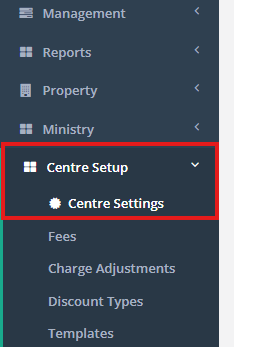
From here you will be presented with your Centre Settings landing page which has a number of options listed along the top. Centre Details will be the default option.
There are (i) icons throughout the software, and particulary the settings, which can provide you with more information or expand upon a feature or function.

Within Centre Details there are number of important functions:
Function | Use |
| Centre Name & Short Centre Name: | The name of your service and the short name that is used within Reporting to save space. |
| Contact Name: | Typically your primary point of contact for the service. |
| Phone # & Email: | Contact details displayed on Invoices & Statements. |
| Charity Number: | Displayed on Invoices & Statements if required. |
| GST No.: | Displayed on Invoices & Statement if required. |
| Address: | Displayed on Invoices & Statements. |
| Age Enrolments End, Minimum Time in Session & Enrolment Types: | Settings to configure your over enrolment structure for the service. |
| FAR#3 Grace Period: | A configurable grace period for FAR#3 and how Discover captures these breaches withinits reporting. Please note, this will not change how FAR#3 is applied at your service by Ministy, just which absences are captured. We recommend that you leave this as the default 15min. More information of FAR can be found here within the Funding Handbook. |
| Send Automated Immunisation Reminders: | If you are still recording immunisation information through Discover, this will provide families with automated reminders when applicable. |
Background Image & Logo Image: | The image displayed on the Discover App if used and on your Invoice and Statements. |
Roster settings
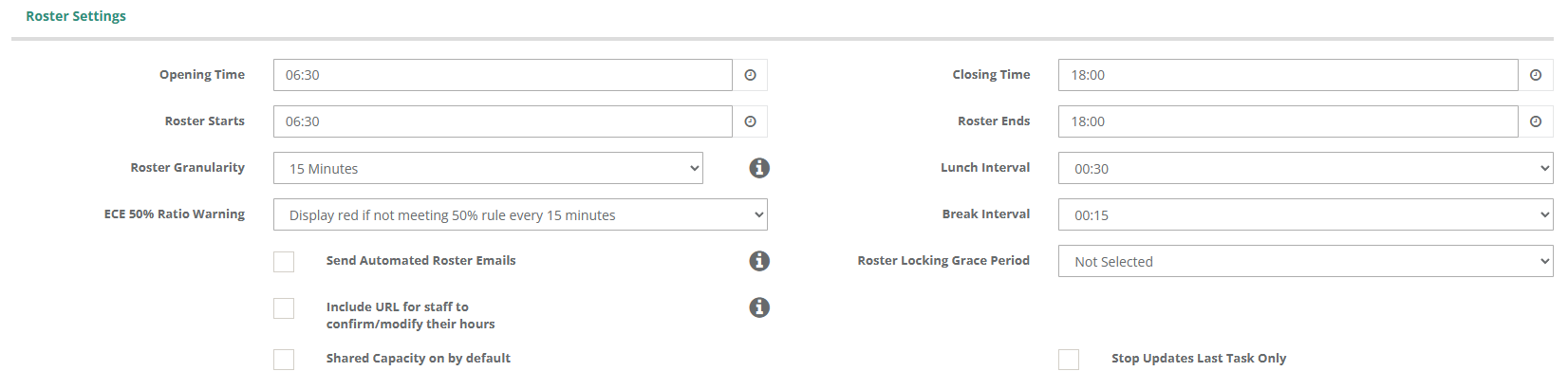
These dictate some of the base rules that Discover uses to operate your roster.
Function | Use |
| Opening & Closing Time: | These are your Licensed times. |
| Roster Starts & Roster Ends: | These are the hours typically available on your roster by default. |
| Roster Granularity: | Default setting is 15min. We do not recommend that you alter this setting. |
| Lunch Interval: | The default length of time for lunch breaks when added to your roster. |
| Break Interval:: | The default length of time for breaks when they are added to your roster. |
| ECE 50% Ratio Warning | A warning can be shown in the roster if you are in breach of the 50% ratio rule. Alternatively, you can switch this off entirely. |
| Send Automated Roster Emails: | With this on, automated emails will be sent each evening to your Staff Members with a valid email address. |
| Include URL for Staff to confirm/modify their hours: | With this on, those email will include a link that will allow Staff Members to confirm or modify their worked hours. |
Shared Capacity on by Default: | This refers to Regulation 44a and if it is always on by default. More information on 44a can be found here. |
You may opt to have your Roster Starts & Roster Ends start before and end later than your licensed time. One reason for this is to make it easier to roster meetings after centre closing, or schedule in prep-work before the service opens.
Waitlist Settings
Here, you will be able to modify your Waitlisting Settings.

| Function | Use |
| Waitlist Confirmation Weeks: | If a number is present in this field, Discover will dend an automated email to families on the waitlist requesting if they wish to remain on the waitlist. |
| Send Waitlist Confirmation Email to Centre: | If active, the service will be informed if a family has chosen to remain on the waitlist. |
| Show Toileting Question on Enquiry Widget: | If active, a toileting question will be on the Enquiry Widget |
| Show Previous Childcare Question on Enquiry Widget: | If active, a Previous Childcare question will be on the Enquiry Widget. |
Centre Holidays
Centre Holiday Settings are controlled here and directly impact various parts of Discover.

| Function | Use |
| Holiday Region | This assigns the correct Provincial Holiday to your Centre Calendar |
| # Holiday Days | The number of discounted holiday and absent days a child is entitled to within a calendar year, pro-rata'd. |
| Automatic Holiday Entitlement | Dictates if holiday enrolments are calculated when an enrolment is modified. If off, holdiay entitlement defaults to # Holiday Days |
Special Discount | Provide variable discounts to Holiday Entitlements. Hover of (i) for in-depth examples. |
Tablet Settings
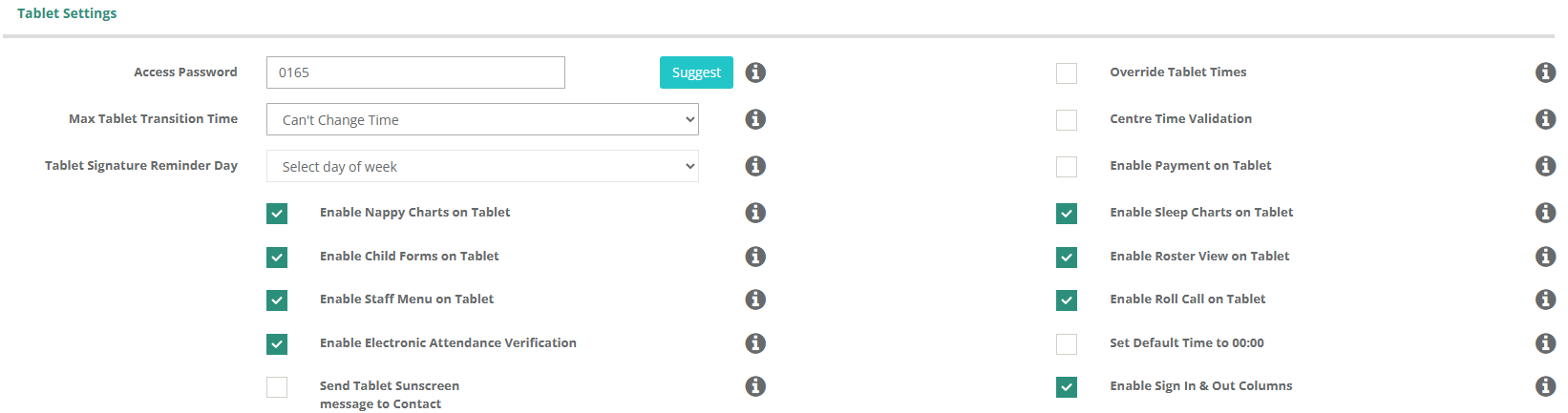
Tablet functionality is set here amd can be changed to suit service needs.
Function | Use |
| Access Password | Access to allow view lists of children via Smart Log within Tablet. |
| Max Tablet Transition Time | The window of time that a parent can manipulate the sign in / out time. |
| Tablet Signature Reminder Day | Select a day to remind families to sign the weekly signn-in sheet. |
| Enable Nappy & Sleep Charts on Tablet | Enables digital sign-off sheets on the tablet. |
| Enable Child Forms on Tablet | Enables digital forms on the tablet. |
| Enable Staff Menu on Tablet | Enables access to staff menu. |
| Enable Electronic Attendance Verification | Turns on this suite of features. More information on EAV can be found here. |
| Enable Sign In & Out Columns | Dictates if these columns are present in both the Children and Roll Call menus. |
| Override Tablet Times | When enabled, if a parent makes a record outside of a centre's opening or closing time, the attendance is automatically changed to the opening or closing hours. |
| Centre Time Validation | When on, this prevents parents from sign in outside of licensed times. |
| Enable Payment on Tablet | Allows for payments to be recorded on the tablets by Staff and Educators against profiles in Discover. |
| Enable Roster view on Tablet. | Allows visibility of the Staff Roster via the Tablet. |
| Enable Roll Call on Tablet. | Allows roll calls to be completed on the Tablet. |
| Set Default Time to 00:00 | Places a default 00:00 time within sign in / out fields. |
Send Tablet Sunscreen Message to Contact | If enabed, a sunscreen reminder message will be present to the contact upon sign in. |
Transition Settings
Settings for the Transitions Module can be set here. You can also find more information on Transitions in our guide here.

| Function | Use |
| Show Transitions Fields on Child | This allows you to set a Transition stage on a child's contact, outlining where they may be in their journey at your service. |
| Show Transition on Menu | This allows access to the Transition Module. |
| Transition Period (Months) | This sets how far into the future you can view enrolment information for in the Module. We recommend 3-6 months. |
| Show Child Image On Transition | Each Child Profile will have a photo visible on its card if one has been assigned. |
Enrolment Settings
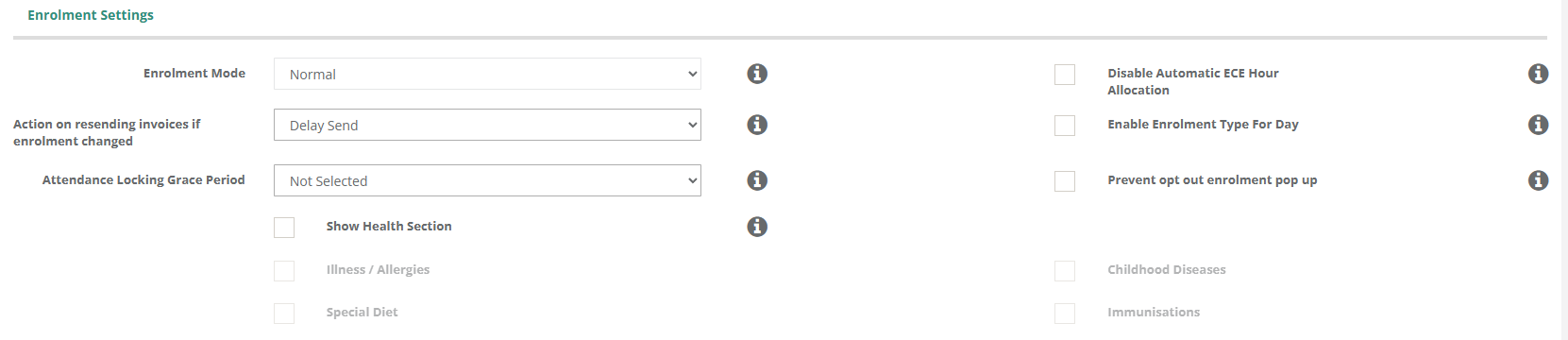
Settings for Child Enrolments are managed in this section.
| Function | Use |
| Enrolment Mode | Controls what Enrolment mode your service uses (e.g., Normal, Sessions & Courses) |
| Action on resending invoices if enrolment changed | This setting dictates the behaviour of a child's modified enrolment (e.g., send immediately, send alongside automated invoicing, do not sent at all). |
| Attendance Locking Grace Period | Allows you to prevent previous enrolment history from being edited beyond the range selected. |
| Disable Automatic ECE Hour Allocation | Discover will automatically allocate ECE20 hours. While this auto-allocation can be edited at any point, enabling this prevents this from occuring at all. |
| Enable Enrolment Type For Day | Allows for the Enrolment Type of enrolled days be modified within the enrolment screen. |
| Prevent opt-out enrolment pop-up. | Enabling this feature will prevent an administrator fromopting out of the enrolment modification warning. |
| Show Health Section | Enabling this will allow a service to select what Health Information they opt in to collecting on their Enrolment Forms. |
Invoice Settings
Our Enrolment Settings are very comprehensive. Please refer here for detailed information regarding set up.
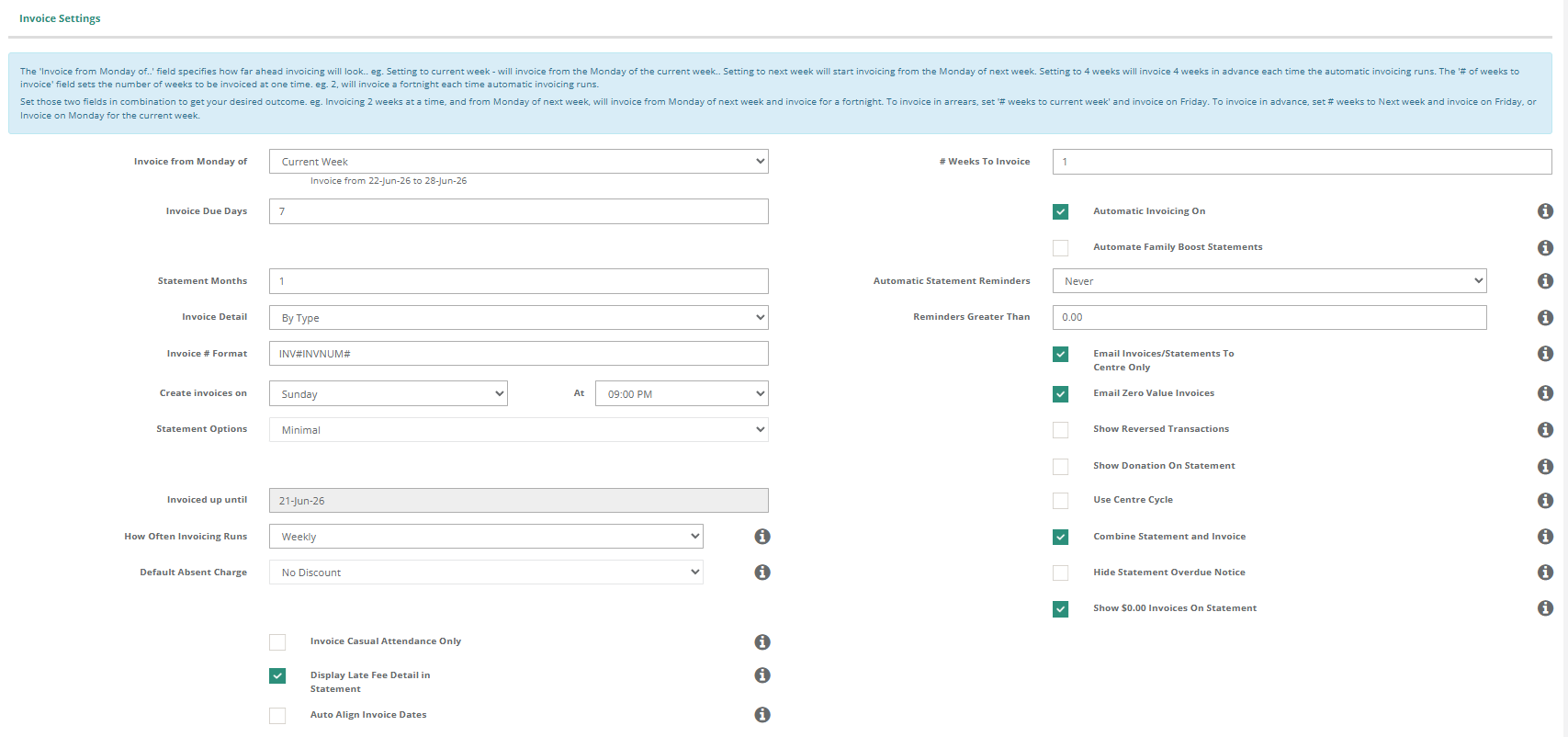
Early & Late Fee Settings
Used to control Early and Late fees at your service. Activating this feature will enable visibility of the Late Fees section of the navigation menu. Please see here for more information.

Bonds
Used to enable and record Bonds at a service. Please see here for more information.

Payments - Xero Integration
Used to enable Xero Integration for your service. Please see here on how to connect Xero.

Payments - WINZ Options
Discover can automate WINZ payment receipting at your service. To enable it, follow this guide on how to set up automatic receipting.

SMS Settings
To be able to send SMS from Discover, you must also have a Twilio Account. More information on Twilio can be found here.

Send Emails from the Following Accounts
- Allows you to choose the email addresses that automated communications are listed as coming from.
- Before modification, all emails sent from your service will be from the email listed in Centre Details > Email.
- For example, all Invoices and Statements could be set to Accounts and accounts@littleseeds.co.nz

Email Notification
Children with an Ends Date in their enrolment for the current week will be included in the email reminder sent to the email addresses within this section.

Website Widgets
Make sure your information is correct for the Widget to be displayed on your website.

| Function | Use |
| Email Enquiries /Applications to | Select the specific email address(es) that receives enquiries and applications. There can be more than one. |
| Minimum Days | Set if there is a minimum day requirement at your service for enrolments. |
| Is Widget Email/Address/Mobile Optional | Sets this field as mandatory within the Enquiry and Application Widgets. |
| Not Open for Enrolments | Set the Widget as closed for Enrolments if your waitlist or roll is closed. |
Report - Options
Sets a Print Time on all reports if you required for your internal process.

Was this article helpful?
That’s Great!
Thank you for your feedback
Sorry! We couldn't be helpful
Thank you for your feedback
Feedback sent
We appreciate your effort and will try to fix the article