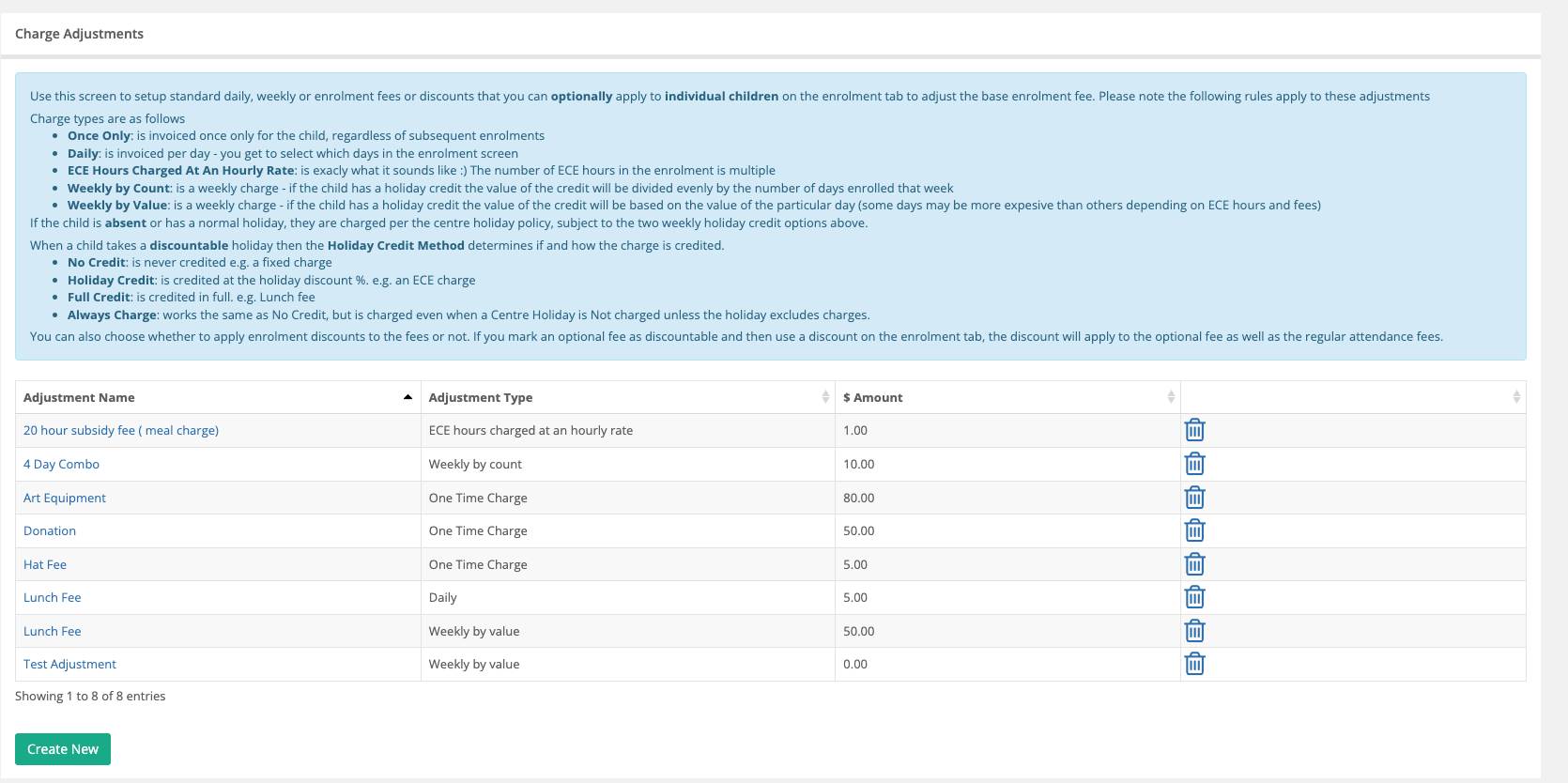
Charge Adjustments can be used to set up standard daily, weekly or enrolment fees or discounts that you can optionally apply to individual children on the enrolment tab to adjust the base enrolment fee.
Charge types are as follows:
- Once Only: is invoiced once only for the child, regardless of subsequent enrolments.
- Daily: is invoiced per day - specific days can be selected in the enrolment screen.
- ECE Hours Charged At An Hourly Rate: as described. The number of ECE hours in the enrolment is multiple.
- Weekly by Count: a weekly charge - if the child has a holiday credit, the value of the credit will be divided evenly by the number of days enrolled that week
- Weekly by Value: a weekly charge - if the child has a holiday credit, the value of the credit will be based on the value of the particular day (some days may be more expensive than others depending on ECE hours and fees).
- Booked Hours: a charge applied to each booked hour over the week.
- Non 20 Hours ECE Hours: charges each hour outside of the 20 Hours ECE hours.
If the child is absent or has a normal holiday, they are charged per the centre holiday policy, subject to the two weekly holiday credit options above.
When a child takes a discountable holiday then the Holiday Credit Method determines if and how the charge is credited.
- No Credit: is never credited e.g. a fixed charge
- Holiday Credit: is credited at the holiday discount %. e.g. an ECE charge
- Full Credit: is credited in full. e.g. Lunch fee
- Always Charge: works the same as No Credit, but is charged even when a Centre Holiday is Not charged unless the holiday excludes charges.
You can also choose whether to apply enrolment discounts to the fees or not. If you mark an optional fee as discountable and then use a discount on the enrolment tab, the discount will apply to the optional fee as well as the regular attendance fees.
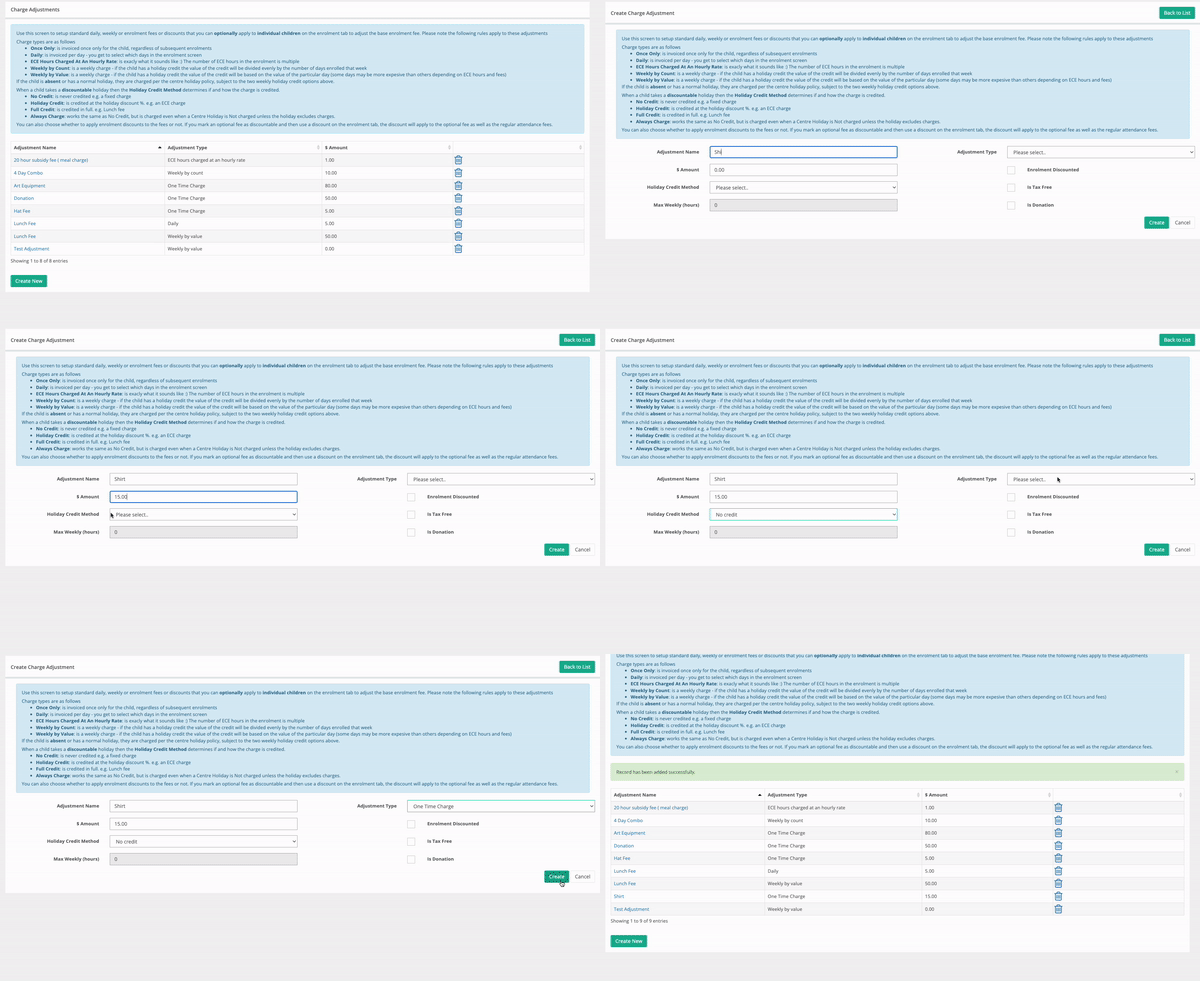
To input a new charge adjustment, administrators will navigate as follows:
1. In the Discover system, select Centre Setup from the menu
2. Select Charge Adjustment
3. to the bottom left of the screen, select Create New
4. Input the information as follows:
- Adjustment Name
- $ Amount
- Adjustment Type
- Holiday Credit
- Enrolment Discounted
- Is Tax Free
- Is Donation
5. Once collected, select Create
This Charge Adjustment is now embedded into the Discover system for administrators to use.

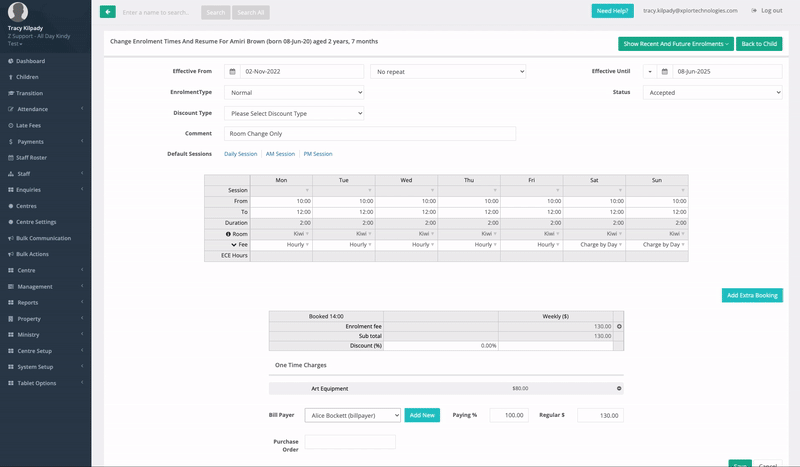
Apply to Enrolment
Navigate to the Child Record > Enrolments > Select Enrolment. Use the "+" sign on the enrolment form and select the charge adjustment and save the changes.
Holiday Discount Method
When a child takes a discountable holiday, the Credit Method determines how the charge is credited.
- No Credit: is never credited during a Holiday. If centre calendar day is set to "No Charge" then this will not charge for this fee
- Holiday Credit: is credited at the holiday discount %
- Full Credit: is credited in full.
- Always Charge: works the same as No Credit, but is charged even when a Centre Holiday is "Not Charged" unless the holiday excludes charges.
How the Charge Adjustment present varies based on the type of Adjustment selected. Daily, Weekly, Booked Hours and X by Y variants will be presented on a single invoice and statement alongside any applicable enrolment charges. Once Only Charge Adjustments, such as one off Enrolment Fees, will generate their own seperate invoice once the invoicing has processed for the enrolment that the Adjustment is attached to.
Was this article helpful?
That’s Great!
Thank you for your feedback
Sorry! We couldn't be helpful
Thank you for your feedback
Feedback sent
We appreciate your effort and will try to fix the article