You are able to set up webhooks and integrations with approved third-party providers within Discover via Centre Settings > Integrations. These webhooks will dynamically push specific pieces of data through to these provider platforms.
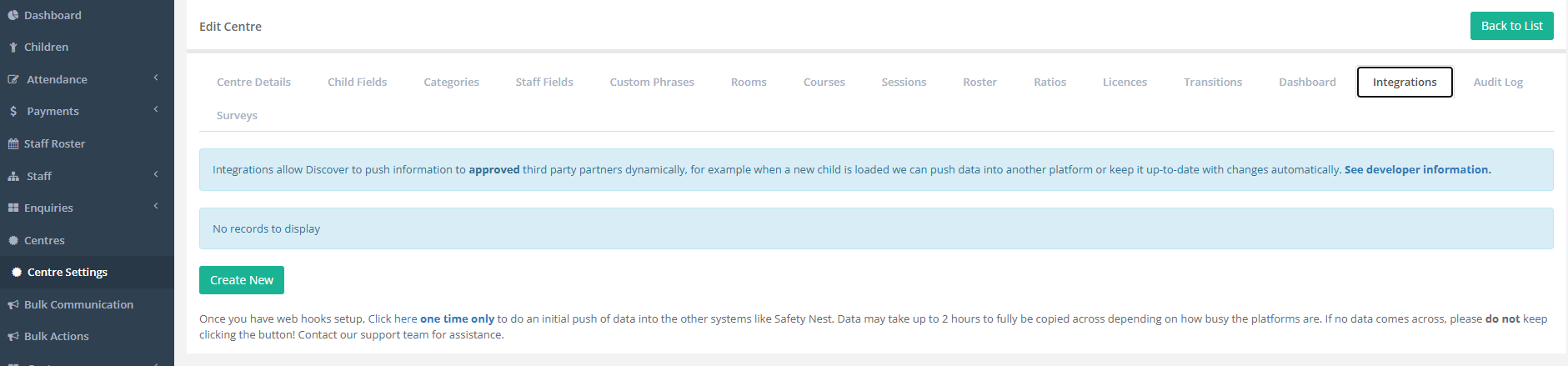
Within the Integrations Tab, you are able to expand upon See Developer Information in order to view instructions on how to receive this information and on what specific data is pushed.
Please note, you will require a Partner ID. Please reach out to our support team at support@superioradmin.co.nz to facilitate this.
It is likely that you will have been provided with a webhook to input by the partnered platform. You will need to ensure that this is added exactly as provided, and we recommend copying and pasting this information in to prevent errors.
Adding a webhook into Discover is a simple process:
- Select Create New.
- Select your Webhook Type (Staff Data, Child Data or Staff Holidays).
- Enter your Webhook Name.
- Enter your Webhook URL.
- Select Save.
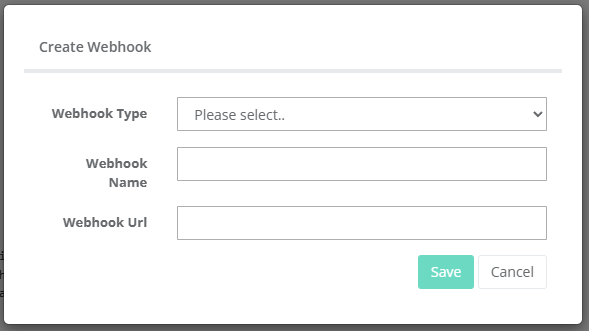
Once this has been added, ensure that the inputted webhook matches what has been provided to you.
At the very bottom of this page, there is a function to push the data and initiate the connection via click here one time only.

Data can take up to two hours to be fully copied over depending on how busy the platforms are.
If you run into problems, please contact your third-party platform provider who will be able to advise you on next steps. This might be providing you with a new webhook directly or it may be escalated internally with the Discover Support Team.
Was this article helpful?
That’s Great!
Thank you for your feedback
Sorry! We couldn't be helpful
Thank you for your feedback
Feedback sent
We appreciate your effort and will try to fix the article