These instructions are only for a Teacher who has not set up their Playground Log in from the Welcome to Playground Email.
If the Teacher has already set up their account - please see here
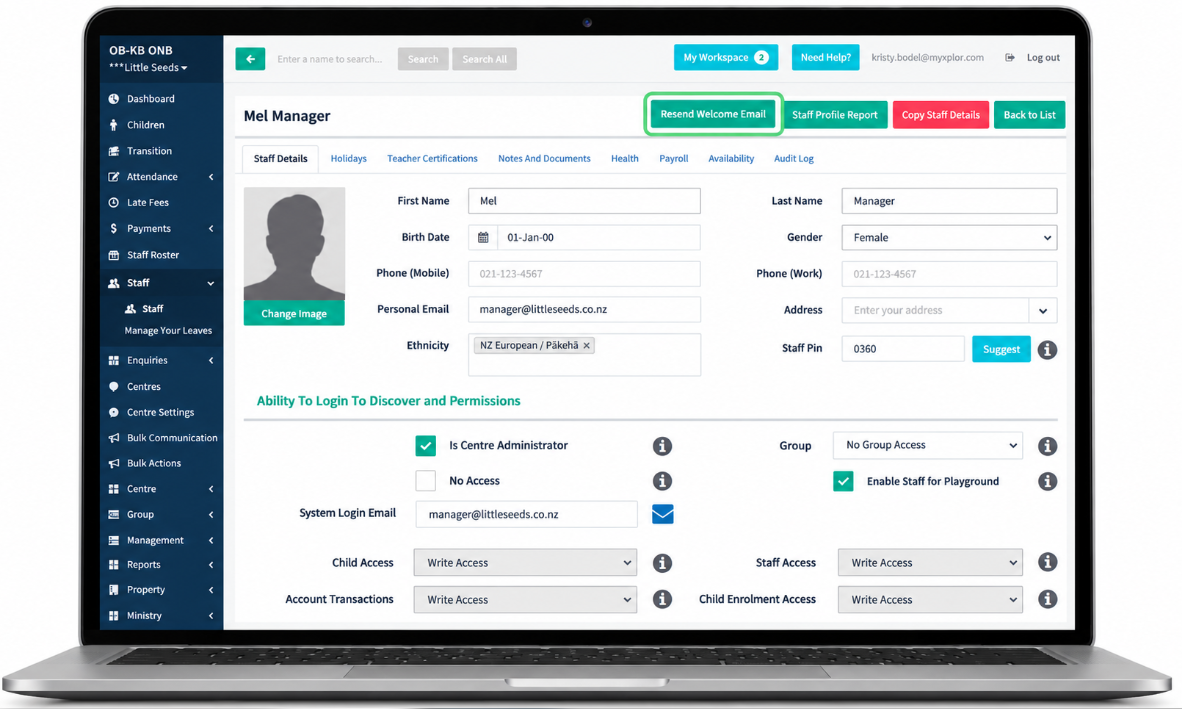
- Go to the Staff Screen
- Select the Staff Member
- Select Resend Playground Invitation
- If the resend Playground Invitiation button is not visible you will need to revisit the
Updating Existing Teacher Details here - If your teacher is not receiving the Invitiation to their email address please email through to support@superioradmin.co.nz
and provide the following Information
- Email Subject: Teacher is not receiving Playground Invitation
We need to know this information to be able to assist. - Centre Name:
- Staff Member Name:
- Staff Member Email address:
- Staff Member Phone Number:
Was this article helpful?
That’s Great!
Thank you for your feedback
Sorry! We couldn't be helpful
Thank you for your feedback
Feedback sent
We appreciate your effort and will try to fix the article