A Fee Chain allows a child's enrolment to automatically move to the next fee structure as they get older, ensuring invoicing continues without interruption.
For example, a fee for children aged 0–1 years can automatically transition to a 2-year-old fee when the child reaches the appropriate age.
While Fee Chaining can reduce administration by automating fee changes, we generally do not recommend using it between the ages of 2 and 3 years. This is because children may become eligible for 20 Hours ECE funding, and creating a new enrolment at this stage can help ensure important funding requirements, such as completing a new attestation, are not overlooked.
If Fee Chaining is not used, invoicing will stop when a child reaches an age outside the fee's age range. A new enrolment can then be created using the appropriate fee structure.
To help you stay on top of these changes, the system will automatically send an email notification if a child can no longer be invoiced because they have outgrown the age range of their current fee. This gives you the opportunity to update their enrolment and continue invoicing correctly.
How to set up a Fee Chain:
- Select the Fees Menu
- Select the First Fee (this will be the younger age bracket)
- Scroll to Fee Chain
- Select the Fee Name Covering the next age bracket
- Scroll to the bottom and select Save
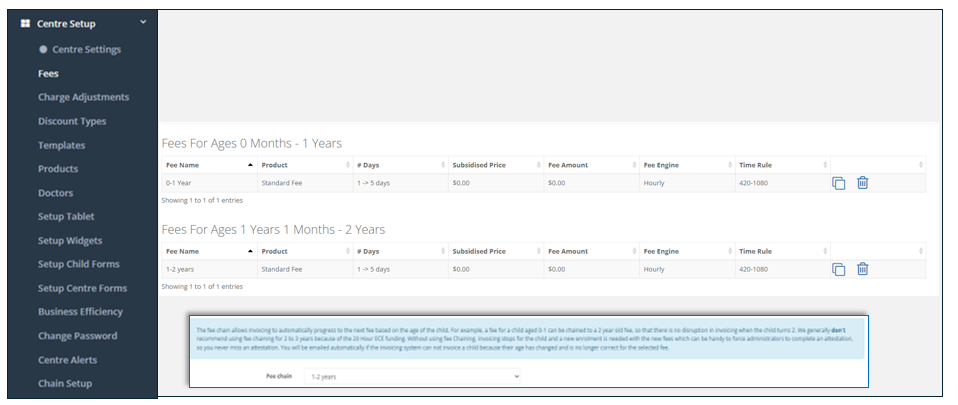
In this example: Any child on Fee 1 will move to Fee 2 once they are 13 months old, without you having to action it.
Was this article helpful?
That’s Great!
Thank you for your feedback
Sorry! We couldn't be helpful
Thank you for your feedback
Feedback sent
We appreciate your effort and will try to fix the article