Printing Enrolment Forms & Attestations
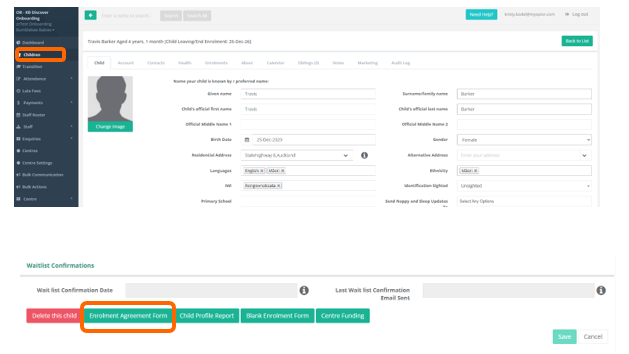
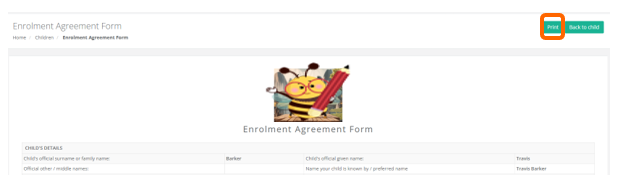
You are able to print out a Child's Enrolment form from their Child Profile which will contain all of the relevant infomation recorded within it. Navigate to a Child and select Enrolment Agreement Form > Print.
The Enrolment Form will only show the parts of the Health Section that have been enabled within Centre Settings > Enrolment Settings. For example, if you have disabled Immunisation Records via the Enrolment Settings, but have chosen to record this information within the child's Health tab, the immunisation records will not be present on the printed enrolment form.
Please ensure that you are securely recording and storing your signed Enrolment Forms. This can be achieved via scanning the returned documentation and uploading it against the Child's Profile within the Notes section, or alternatively, within a secure storage system of your choice within your service.
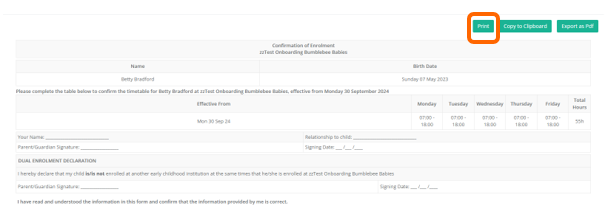
Attestations must be printed out and signed by a parent / guardian whenever there is a change to a child's enrolled times or days at a service. Again, please ensure that copies of this attestation are securely recorded in an easily accessible manner within your service.
It's not a matter of if a service will be audited, but when.
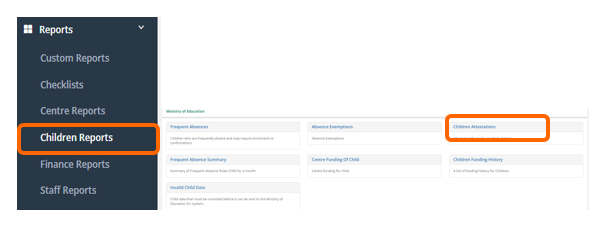
You can print out attestation in bulk if you have made changes to a number of future bookings at your service. Navigate to Reports > Children Reports > Children Attestations and select the relevant date rage.
Was this article helpful?
That’s Great!
Thank you for your feedback
Sorry! We couldn't be helpful
Thank you for your feedback
Feedback sent
We appreciate your effort and will try to fix the article